Native macOS · Universal voice · Local-first

    Pressay

    Hold, speak, release — to write from any application.

    Pressay turns speech into text from any macOS application. Version 1.2.7 makes accounts self-hosted with Better Auth and secures the macOS sign-in flow with OAuth 2.1 and PKCE.

    Role
    Solo product design, macOS UX, architecture and Swift development
    Period
    2026 public release
    Status
    Stable 1.2.7 · download available
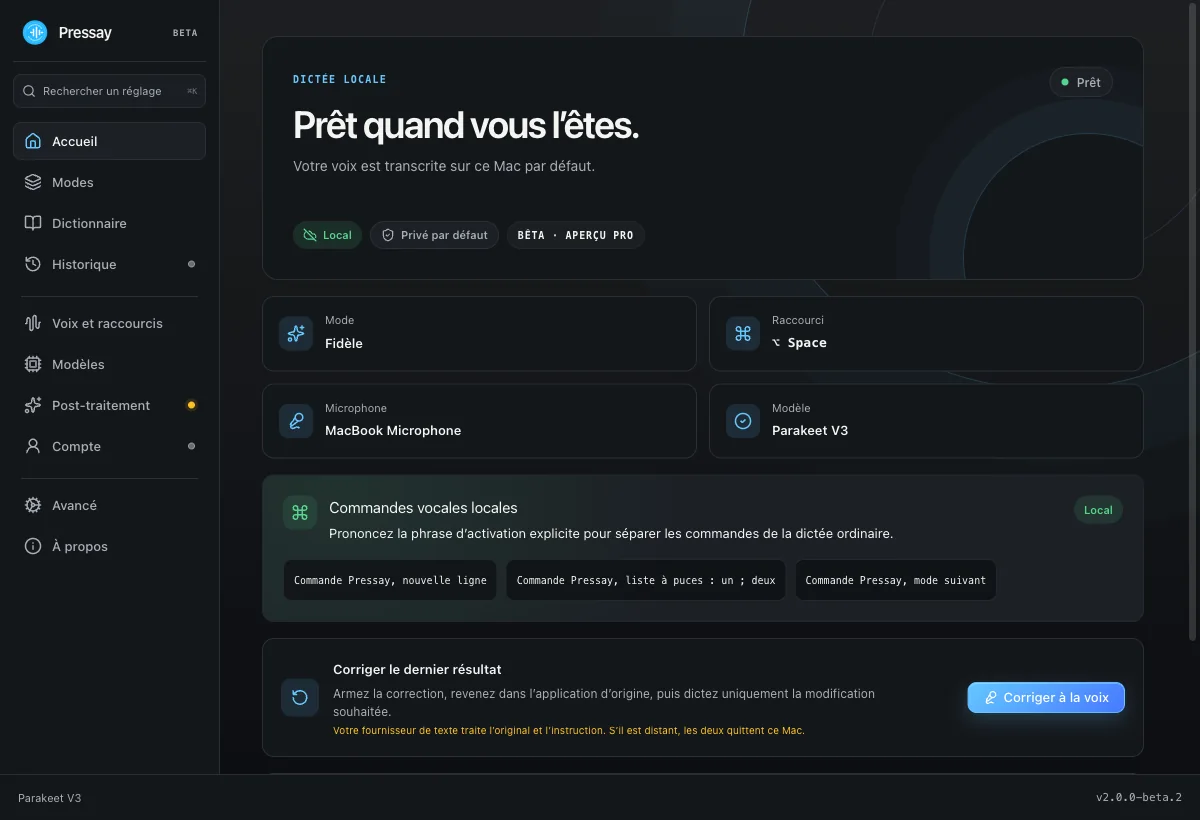
    Pressay — interface principale

    Public version 1.2.7

    Install Pressay

    macOS 14+ · Intel and Apple Silicon

    Optional history is encrypted on the Mac, the API key stays in Keychain and no telemetry is sent to Yodev.

    The download is free. API calls may be billed directly by OpenAI.

    1. 1Download Pressay.dmg from this page.
    2. 2Open the DMG and drag Pressay into Applications.
    3. 3Launch Pressay, then grant Microphone and Accessibility.
    4. 4Add your personal OpenAI API key in settings.

    Verifiable evidence

    arm64 + x86_64

    universal binary

    Apple Silicon and Intel Macs

    macOS 14+

    compatibility

    Sonoma or later

    AES-256-GCM

    local history

    Optional with configurable retention

    140/140

    Swift tests

    Release suite validated

    How to read the numbers : The CTA points to the universal 1.2.7 DMG signed with Developer ID, notarized by Apple and published with its checksum.

    Context and role

    The core gesture is deliberately immediate: hold Fn/Globe, speak, then release to write at the current cursor.

    The interaction stays out of the way until needed: the app lives in the menu bar, starts on Fn/Globe and restores the clipboard after insertion.

    The vision extends beyond dictation to selection transformations and controlled actions, but each capability will only be exposed once its complete journey is genuinely functional.

    Retained constraints

    • Run on Intel and Apple Silicon Macs capable of macOS 14 or later.
    • Never upload audio when no speech is detected locally.
    • Store the API key in Keychain and optional history in an encrypted local file.
    • Preserve the insertion target when a user starts another dictation.
    • Ship complete signed updates without telemetry or system profiling.

    Decisions and rejected options

    DECISION 01

    A native modifier shortcut

    Dictation must start without stealing focus or keeping a permanent floating window.

    Choice
    Fn/Globe, Right Option or Right Command trigger hold or toggle mode from the menu bar.
    Rejected
    A complex global shortcut or an app-specific text field.
    Trade-off
    Microphone and Accessibility permissions need a clear first-run explanation.
    DECISION 02

    An OpenAI key owned by the user

    A Yodev backend would add accounts, billing, retention and operational responsibility.

    Choice
    The personal key stays in macOS Keychain and authenticates transcription directly with OpenAI.
    Rejected
    A shared proxy bundled with a Yodev subscription.
    Trade-off
    The user manages OpenAI billing, while Yodev receives neither audio nor text.
    DECISION 03

    Developer ID DMG and Sparkle

    An unnotarized ZIP raises warnings and provides no trustworthy update path.

    Choice
    A notarized universal DMG, signed with Developer ID and referenced by an Ed25519 Sparkle appcast.
    Rejected
    An ad hoc binary that requires bypassing Gatekeeper.
    Trade-off
    Publishing requires an Apple Developer account and a protected CI secret chain.

    Journey architecture

    1. 01

      Global shortcut

      Observes Fn/Globe or a right modifier without taking focus.

    2. 02

      Local capture

      Temporary audio and speech detection before any network call.

    3. 03

      Transcription

      Direct OpenAI request with the active language, model and vocabulary.

    4. 04

      Safe insertion

      Returns to the target app, pastes and conditionally restores the clipboard.

    5. 05

      Update

      Complete DMG validated by Sparkle, Ed25519, Developer ID and Gatekeeper.

    Quality and verification

    • Migration tests for preferences, API key and history key from the previous app identity.
    • Idempotent migration: current values are never overwritten and Keychain failures can be retried.
    • Xcode tests, static analysis and a universal Release archive included in the pipeline.
    • Deep app and Sparkle signing, notarization, stapling and Gatekeeper assessment before publication.
    • Automated DMG mount checking the app, Applications link and SHA-256 checksum.
    Pressay — vue produit

    What is actually delivered

    • Fn/Globe dictation available from any macOS application.
    • Dedicated ChatGPT Web and Codex compatibility when their custom composer is no longer exposed through Accessibility.
    • Pressay restores the clipboard after a successful insertion without overwriting anything copied in the meantime.
    • Twelve built-in modes, custom modes and opt-in per-app profiles.
    • Selection transformation with an editable preview, target revalidation and copy fallback.
    • A per-mode cloud policy: direct processing when allowed, or an exact payload preview and confirmation on request.
    • A configurable, dismissible HUD with in-capture mode selection and post-insertion actions.
    • Voice correction for the latest insertion and per-app inject, preview, copy or exclude policies.
    • An optional Voice Inbox with separate encryption and retention.
    • Optional encrypted local history retained for 24 hours, 7 days or 30 days.
    • A cancellable transcription queue preserving each target application.
    • A reproducible release chain producing a DMG, checksum and appcast.

    Known limits

    • WhisperKit provides local transcription; a personal OpenAI key is still required for cloud processing and may be billed by OpenAI.
    • Microphone and Accessibility must be granted in System Settings.
    • Local engines, executable voice commands, integrations and meetings are planned for later releases.
    • The app is independent and is neither published nor endorsed by OpenAI.

    Next step

    • Integrate the local engines and hybrid routing planned for 1.3.
    • Benchmark quality, latency and resource usage on the French, English and technical corpus.
    • Evaluate a complementary App Store edition within sandbox limits without weakening the direct product.

    Technical foundation

    • Swift 6
    • SwiftUI
    • AppKit
    • AVFoundation
    • CryptoKit
    • Sparkle 2.9.2
    • OpenAI API
    • GitHub Actions